
TL;DR: One folder to rule them all — but only if you build it right. Before you move a file, understand what an AI-ready folder - or vault - can actually do. Frontmatter lets the AI filter by date, status, or tag in one search. Backlinks turn your folder tree into a web the AI can crawl. And a well-named folder tree means the AI knows what a file is about before it even opens it.
Neat Markdown features for better organisation
It’s more than just a folder tree. The goal is a vault the AI can search, link, summarize, and navigate. Four features make this possible.
Backlinks: the knowledge web
A backlink is a link inside one file that points to another file — and automatically creates a reverse link so both files know about each other.
Inside a product note: See also: [[Q1 Product Review]]
The AI now knows those two files are related, in both directions. Do this across your vault and you get a knowledge web — every file connected to every relevant file without a separate database telling it what connects to what. No more “Related Documents” section to manually maintain.
The graph view: see your knowledge grow
Obsidian takes those backlinks and draws them as a visual map — every file is a dot, every link is a line.
A product note connects to meeting notes, which connect to a launch plan, which connects to testimonials, which connect to a company record. The graph shows relationships you didn’t know existed — and the AI can navigate the same network.
Your company knowledge isn’t a pile of folders. It’s a network the AI can walk.
Frontmatter: the AI’s cheat code
Frontmatter is a small info block at the top of a file, between --- dashes. It stores things like title, date, status, author, and tags — right inside the file, not in a separate system. More importantly, it’s customizable — you can use it for anything: revision_number, sold_products, etc. It’s like a mini database for your documents.
---
title: Q1 Product Review
date: 2026-03-15
status: active
tags: [product, quarterly-review]
---
Once in Obsidian, it looks like this:
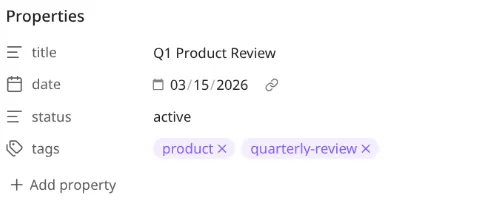 Without frontmatter, the AI has to read the whole file to guess what it is. With frontmatter, the AI can run a query like “Write Q1 Product Review, summing up statuses of all active products” and get exactly the right files — instantly. Every file carries its own ID card.
No API or MCP calls. No database lookups. Just text the AI can read.
Search that actually finds things
The AI’s primary tool is grep (searches every file for a word or phrase and shows you which files contain it and the context around the match). But it’s only as smart as the paths it searches.
With frontmatter, backlinks, and clear folder names, one grep finds results from all three — file body, frontmatter, and filename:
grep -ri "testimonial" 01-Products/Product A/Returns:
01-Products/Product A/Product Notes/launch-plan.md     ← body match
12: - Collect 5 video testimonials from early adopters

01-Products/Product A/Feedback/testimonials.md          ← filename match
1: ---
4: tags: [testimonials, customer-quotes, launch]         ← frontmatter match
Body, frontmatter, filename — the AI finds it regardless of where the match lives.
How these fit together
| Feature | What it does for the AI | What it does for you |
|---|---|---|
| Frontmatter | Filter by date, status, tag, author | No more “where’s the latest version” |
| Backlinks | Know which files connect | One link replaces five search attempts |
| Graph view | Navigate the knowledge web | Spot relationships you’d miss browsing folders |
| grep-friendly paths | Find files by intent, not memory | AI answers questions, not “where’s the file” |
All four together: the vault becomes searchable, linkable, filterable, and navigable — by you and by the AI.
Now, the rules that make it real.
The naming
Rule 1: the path tells the story
A path should read like a sentence. Product + document type + specific topic. When the AI sees 01-Products/Product A/Product Notes/baseline.md, it knows what that file is about without opening it. The path did the work.
Bad: CEO Office/baseline.doc — could be anything. Probably important. Definitely unsearchable.
Good: 01-Products/[Product Name]/Product Notes/baseline.md — you read the path, you know the file. The AI reads the same path and knows it too.
The frontmatter inside gives the AI the metadata. The path gives it the context. Together, the AI never has to guess.
In the template → Naming Convention section.
Rule 2: deep paths are a feature
Human instinct says: flatten, dedupe, don’t repeat yourself. Throw that out. A path with six segments carries six pieces of information:
01-Products/[Product]/Launch/Testimonials/testimonial-acme.mdYes, the product name repeats across Marketing, Research, Operations. Good. Each occurrence says “this file is about this product — and here’s the specific context.” The AI maintains the full tree; depth is information, not waste.
In the template → Target Folder Tree section.
Rule 3: number everything
Prefix top-level folders with two-digit numbers:
01-Products/
02-Relationships/
03-Investors/
04-Marketing/
05-Research/
06-Market Research/
07-Operations/
Three wins: folders sort the same on every machine, you can target a vault slice by searching 01-*, and the number is the stable identity — the label can change, the number doesn’t. Use two digits from the start (you’ll have more than nine folders eventually).
In the template → Target Root Structure section.
The boundaries
Rule 4: split by access, not topic
One giant vault is the dream of search and the nightmare of access control. Split by who should see what:
01-Main Vault/        everyone, day-to-day
02-Legal Vault/       counsel + leadership
03-HR and GDPR Vault/ HR only
Search respects folder boundaries — so does permissioning. When the AI works inside the Main Vault, it physically cannot see a salary file, because that file isn’t in its working set.
In the template → Access Model section.
Rule 5: keep the noise out
Not everything belongs in the AI’s working set. Think of it like a .gitignore for your vault — exclusion patterns that keep the AI focused:
_Archive/— past projects, closed dealsnode_modules/— dependency noise*.png, *.pdf— binary blobs (OCR them first)
An AI searching 5,000 files plus 20,000 archived documents returns noise. An ignore pattern returns signal. Keep the working set lean and the AI gets faster, cheaper, and more accurate.
In the template → .gitignore for Search Efficiency section.
The wiring
Rule 6: expect a second pass
The first tree is a draft. Architecture-first doesn’t mean architecture-once. Migrate, use it for two weeks, then restructure what groaned. Because everything is copy-first (the old tree never moves), a reorg is just another copy pass — not a rescue mission.
The tree you ship on day one will embarrass you by day thirty. That’s the point — it means you’re actually using it.
In the template → Migration Safety Model section.
Rule 7: connect the living code
Documents about your product go stale the moment someone ships a change. The actual code and website are always current. So link them into the vault. Two ways: symlinks or nested git repos.
Symlink — makes a file or folder appear in two places at once. The real repo stays where it is; the vault sees it without duplicating anything:
ln -s ../my-website 01-Products/MyApp/websiteNested git repo — clone or init the repo directly inside the vault. Add its path to the master repo’s .gitignore so the outer repo doesn’t track it. Each repo keeps its own history, works cross-platform without symlink quirks.
Either way, the AI stops reading about the product and starts reading the product. It can answer “what does the pricing page actually say?” by reading pricing.astro, not a spec from eight months ago. Give the AI the keys, not the brochure.
Make sure your vault sharing tool ignores syncing symlinked folders — they’re pointers, not copies. For nested repos, the master .gitignore keeps things clean.
In the template → Products/App subfolders under each product.
Leveling up: external data sources (Mirage)
Symlinks or nested git repos cover local repos and websites. What about Slack conversations, S3 buckets with logs, Google Drive folders, or a live database with analytics data?
There are special tools like Mirage that make external services — S3, Google Drive, Slack, Gmail, GitHub, Postgres, and more — appear as local folders. The AI searches them with the same grep (search every file for a word or phrase) commands it already uses:
from mirage import Workspace
from mirage.resource.s3 import S3Resource

ws = Workspace({
    "/s3":    S3Resource(bucket="company-data"),
    "/slack": SlackResource(token=os.environ["SLACK_BOT_TOKEN"]),
})
await ws.execute("grep -r 'Q3 planning' /slack/channels/ | wc -l")
Around 50 built-in backends. Python and TypeScript SDKs. CLI and FUSE mounts. Open source (Apache 2.0).
You don’t need it on day one — start with local files, symlinks, or nested git repos. Add Mirage when your data sprawl demands it (Slack archive searches, S3 document retrieval, live database queries).
How it looks in the end
A generic, access-aware vault with numbered prefixes and code symlinked in:
Company Vault/
  00-Migration Control/     plan, mapping, tools
  01-Main Vault/
      01-Products/
          [Product]/
              Product Notes/
              Launch/
              Feedback/
              website/           symlink or nested repo
              app/               symlink or nested repo to actual code
      02-Relationships/
      03-Investors/
      04-Marketing/
      05-Research/
      06-Market Research/
      07-Operations/
  02-Legal Vault/
  03-HR and GDPR Vault/
The template has the full, detailed version with every subfolder, plus product-specific and company-specific branches.
What to remember
The entire architecture boils down to one swap: folders aren’t for browsing, they’re for searching. Every folder name is a query filter. Every path is a sentence. Name so the AI knows what’s inside before it opens the file.
Three questions before creating any folder:
- Does this path tell the AI what’s inside? — If not, the name is wrong.
- Who should see this? — If the answer isn’t “everyone,” it’s in the wrong vault. But the fewer the better: simplicity and transparency always win.
- Is this about the product, or is it the product? — If it’s the product — code, website, components — symlink or nested-git it in.
The rest is tactics: deep trees (more signals), numbered prefixes (stable identity), copy-first (safety net), ignore patterns (signal over noise). These matter, but the three questions above catch 90% of architecture mistakes before they happen.
Architecture is just naming with intent. Get the names right and the AI does the rest.
What’s next
You have the principles. Now two ways to put them to work:
- Walk through the template — see the full migration plan template section by section with real examples: Migration Plan Template Walkthrough
- Follow the 14-step process — the step-by-step playbook from first folder to final approval: 14-Step AI-Native Migration Process
Markdown your next move. By Charles Henri Gayot.